How to Use the KPI Resource
The KPI Resource uses custom components that are mapped to tags.
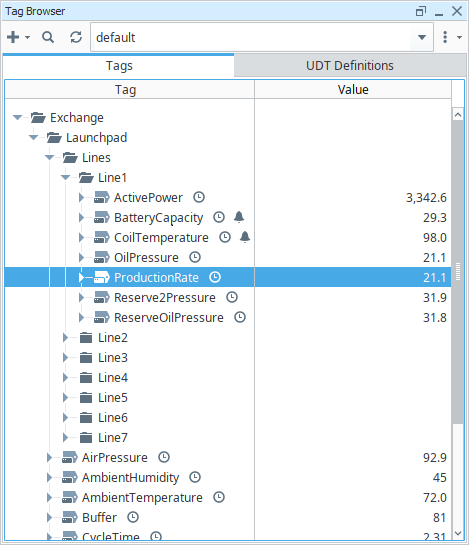
For example, the Value Unit Label component has an view parameter that is set to the path of the [default]Exchange/Launchpad/Line1/ProductionRate tag. When that tag value changes, the displayed value on the component will also change.

How to Configure Tags
This section details how to use the KPI components with your own devices and tags, instead of the default tags. The three procedure options below on how to configure your tags assume that you have already connected your devices and created your tags.
Enter the Tag Path in a Dashboard Widget
When you add a widget to a dashboard, it needs to be configured with a tag path. You can follow the Adding a Widget guide on the Dashboard page to set this up.
Update the Path in the Component View
If you embed the component view in a Perspective view, you can change the path parameter to be your desired tag path.
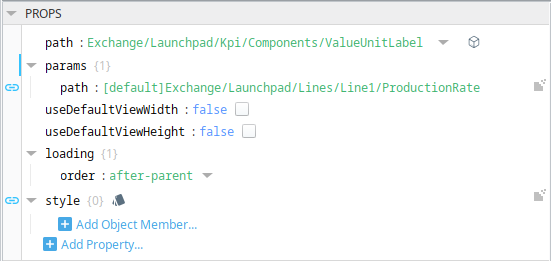
For more information, see the Embedded View Parameters section of the Ignition User Manual.
Change the Demo Tags to Point to your Tags
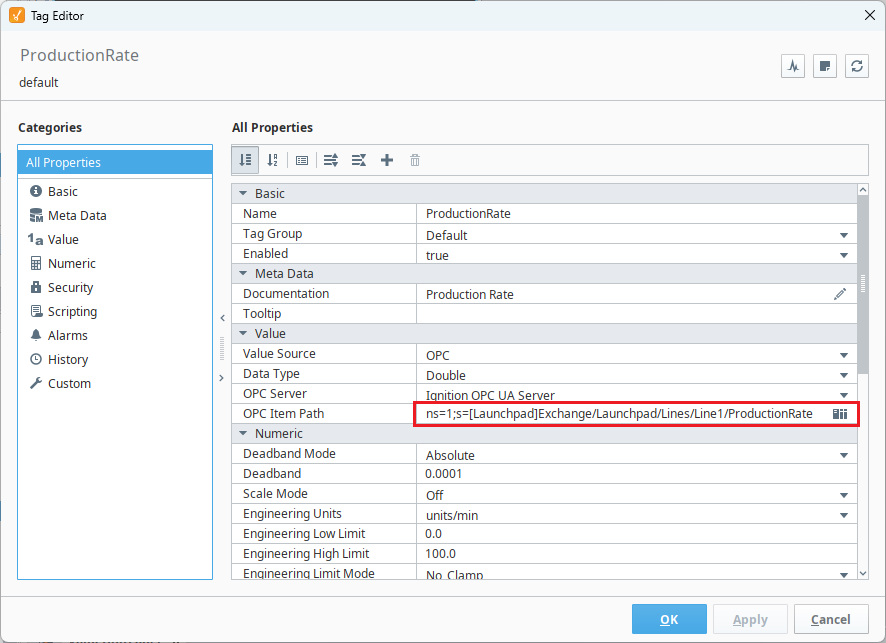
If you use the Tag Browser to find the tag that is already configured in a widget, you can just edit that tag to point to your desired OPC Item. All of the demo tags are set up as OPC tags, so you can point the OPC Item Path of that device, and the OPC Server to point to a different OPC Server (if necessary). If you click the device browser next to the OPC Item Path, you can browse through the devices and items on that OPC server, without knowing the exact path.
How to Configure Localization
All labels within the KPI project are in English. However, it is possible to change the locale of the session by modifying the session.props.locale property. This can be written to using a script when the session first opens, or a component can be bound to it so that a current user can update their language selection as needed. Instructions on how to change the language for component text can be found in the Ignition User Manual Localization and Languages section.