UDT Reference
The Launchpad OEE project relies on the LineConfig UDT for all calculations of the OEE and production values. Each line is set up as an instance of this UDT.
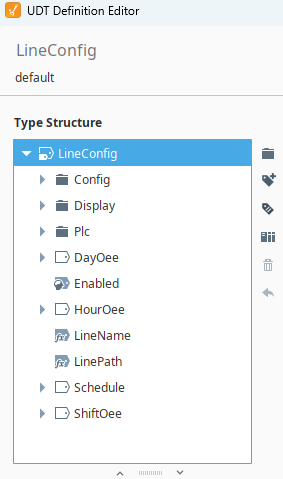
The UDT is broken down into the following components:
- Config
- Outputs and target rates
- DayOee
- OEE values calculated over the current day
- Display
- Options for displaying OEE values
- HourOee
- OEE values calculated over the current hour
- Plc
- Tags for inputs from the PLC and outfeed calculations
- ShiftOee
- OEE values calculated over the current shift
- LineName
- Line name used on all displays
- LinePath
- Path to line instance
- Schedule
- Shift schedule
Config
The Config tag folder contains all the tags that determine the outputs and target rates.

-
OutfeedFactorandRejectFactorare used to calculate production outfeed and reject outfeed. For example, a case counter may be counting each case but if we want production count by the number of bottles in the case we need to set theOutfeedFactortag to the case size. -
RateNamerepresents the name of the current target rate. -
RateTimeis the time interval used for the current target rate (minutes or hours). -
TargetRaterepresents the ideal units per time interval. We store the units of measure in the Engineering Units tag.
Display
The Display folder contains boolean Memory tags to change whether you want to display a certain calculated OEE value for each line. By default, all are set to True.

PLC Inputs
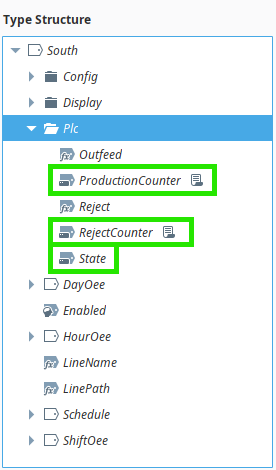
The Plc folder contains three input tags and two expression tags. These are used to determine the line state, production count, and reject count.
-
Outfeedis a calculation based onPlc\ProductionCounterandConfig\OutfeedFactor -
ProductionCounteris an OPC tag that should be connected to your line's PLC to count when a unit is completed. -
Rejectis a calculation based onPlc\RejectCounterandConfig\RejectFactor -
Stateis the current state of the line.-
Three states are recognized:
- 0: Off/Idle
- 1: Running
- 2: Faulted
If your PLC states vary from this list, you will need to use Derived tags to map the states.
-
-
Reject Counteris an OPC tag that should be connected to your line's PLC to count when a unit is rejected.
OEE Calculations
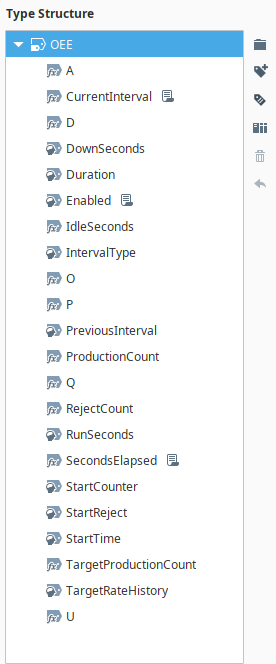
The OEE calculations are handled by the OEE UDT. The Line Config UDT contains three OEE instances, with each one calculating OEE over a different time interval. DayOee tracks realtime OEE over the current day starting at midnight. HourOee tracks realtime OEE over the current hour and records a record in the database for each hour. ShiftOee tracks realtime OEE since the start of the current shift and records a record in the database for each shift.
Calculations
- A. Availability: Run Time / Planned Production Time
- D. Downtime: Down Time / Planned Production Time
- P. Performance: (Total Count / Run Time) / Target Production Rate
- Q. Quality: Good Count / Total Count
- O. OEE: Availability × Performance × Quality
- U. Utilization: (Planned Production Time - Idle Time)/ Planned Production Time
Variables
We see from these formulas that we will need to know the following to calculate OEE:
- Running Time, recorded by the
RunSecondstag. - Down Time, recorded by the
DownSecondstag. - Idle Time, recorded by the
IdleSecondstag. - Planned Production Time, recorded by the
SecondElapsedtag. - Total Production Count, recorded by the
ProductionCounttag. - Good Count, calculated by
ProductionCounttag -Reject Counttag.
Therefore, each interval folder is set up with tags to track these variables.
Production Counter
Production Count is the difference between the starting production counter for the interval and the current PLC count.
Reject Counter
Reject Count is the difference between the starting reject counter for the interval and the current PLC count.
Target Production
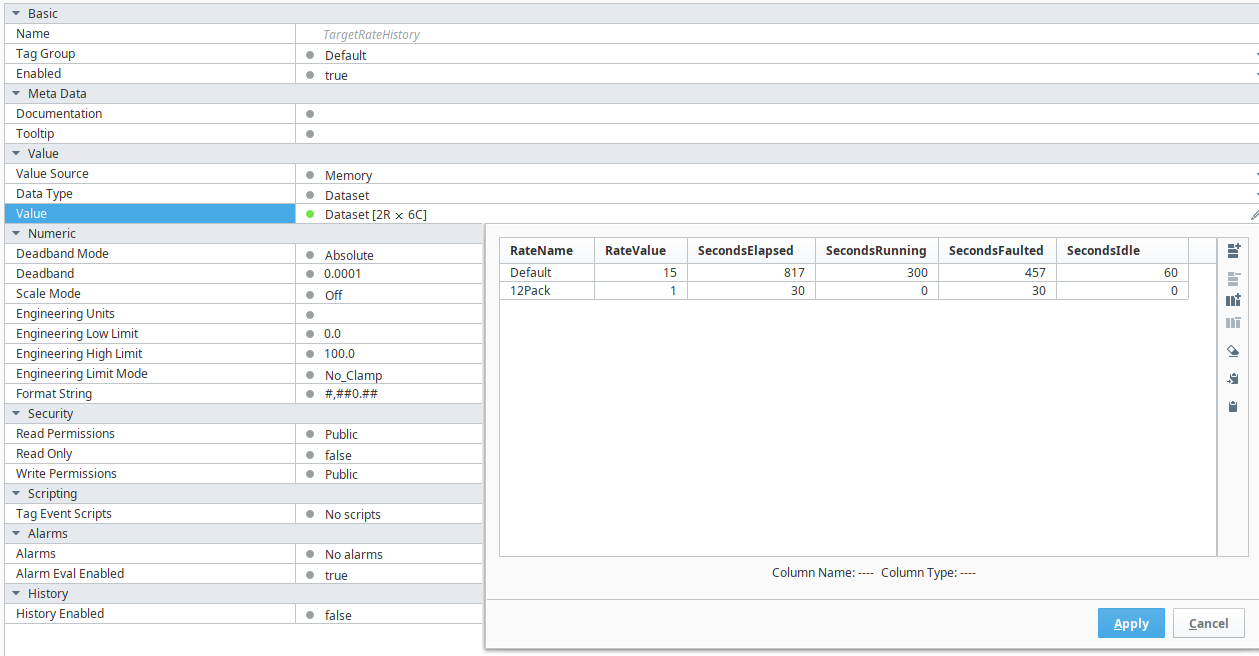
Target production is the target rate multiplied by the planned production time. Since the target rate can change over the time interval, we use a Memory dataset tag named TargetRateHistory. This dataset stores the rate and number of seconds in each state (running, down, idle).
A new row is added to the dataset at the start of the interval and when the user changes the rate using the the Settings screen. The interval timers increment the times for the most current row. Target production is calculated as the sum of SecondsRunning/60 * Target Rate (units/minute).
Enabling OEE Calculation
The enabled tag is set to false by default. When this tag is false, no timers or counters will increment.
Start of Interval
A tag change script runs at the start of each interval. The script first records the final value from the previous time interval in the database. It then clears the tag counters and inserts a new record in the database.
The start interval tags are: HourOee/CurrentInterval, DayOee/CurrentInterval, and ShiftOee/CurrentInterval.
In each interval folder, the following tags are cleared at the start of an interval:
DownSecondsRunSecondsStartCounterStartRejectTargetRateHistory
Timer Tags
A timer tag within each interval folder is set up with a script that will update the counters needed for the OEE calculations. The timer tags are HourOee/SecondsElapsed, DayOee/SecondsElapsed and ShiftOee/SecondsElapsed.
The timer tag change scripts increment the following tags:
DownSecondsRunSecondsTargetRateHistory
Shifts and Schedules
The Schedule UDT is made up of instances of the Shift UDT. Each shift can be disabled, and has a start time and stop time. The times are stored as integers representing the hours and minutes in 24-hour time format.
For example, 600 would be 6:00 AM and 1,400 would be 2:00 PM
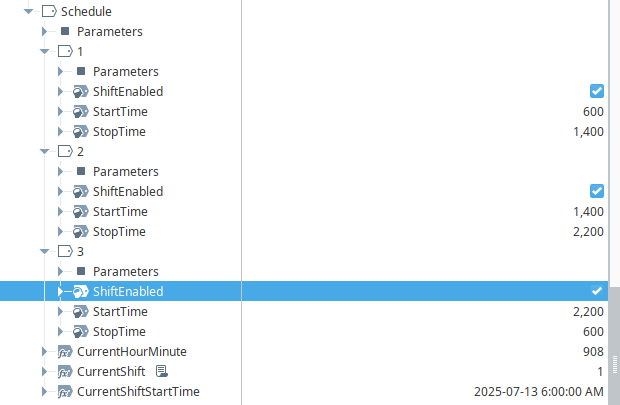
The Schedule UDT tracks the current Gateway time and determines the current shift.