Popup
The Popup component is opened whenever a component on the Overview and Dashboard pages are clicked. If the selected component includes two tags, the Popup Dual Tag widget will be opened instead.
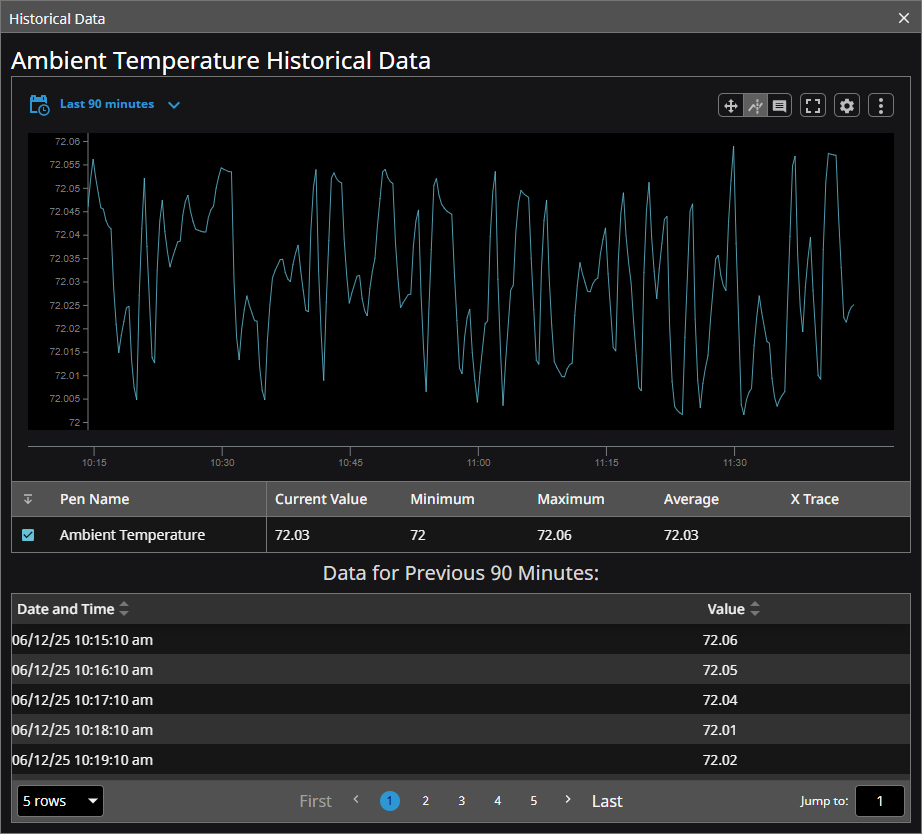
It contains a Power Chart with the tag history of the selected tag. The Power Chart will show the current value, minimum, maximum, average, and you can use the cursor to X trace along the graph and see the value at any time. Underneath the Power Chart is a Table listing values by the date and time they are stored in the tag history database.
Parameters
| Name | Data Type | Description |
|---|---|---|
| historyProvider | String | The name of Tag History Provider database for the selected tags, which can be found in your Ignition Gateway under Config > Tags > History. |
| path | String | The tag path for the tag values that are displayed in the Power Chart and Table. If the Documentation property is configured it will be used as part of the title and a label of the Power Chart and Table, otherwise the tag name will be used.Example tag path: [default]Exchange/Launchpad/AmbientTemperature |