Shift Setup
Each line can have up to three shifts to calculate OEE and production values over each shift. All shifts are disabled by default when first creating a line, so the OEE and production values will be calculated only for each hour and day unless shifts are enabled.
If no shifts are enabled, the Overview page will show "Not Scheduled" on each line if the interval selected is Shift, but will still show calculations if the interval is Day or Hour. If you want to calculate the values for shifts, you will need to use the checkboxes to enable the desired shifts for each line. Start and stop times are in 24 hour time format.
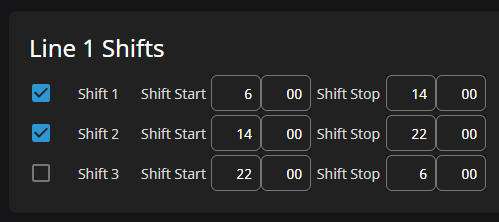
In the example image below, Shift 1 is from 6:00 AM to 2:00 PM, Shift 2 is from 2:00 PM to 10:00 PM, and Shift 3 is disabled.
The calculations for OEE and production do not work for overlapping shifts, so you must have shifts start and end with no overlap.
If you have a more complicated setup that requires overlapping shifts, or more than 3 shifts, you will have to set that up as either multiple lines or modify the LineConfig UDT to include more shifts.
Shifts are unique to each line. You might have many lines running on the same shift in your plant, but you will have to enable those shifts and configure the start and end times for each.